3D Printing Technology: Applications, Benefits and Career Opportunities
3D printing has changed the way designers, engineers, students, makers and manufacturers approach product development. Instead of removing material from a larger block, a 3D printer creates an object layer by layer from a digital design. This process is commonly known as additive manufacturing.
From educational models and mechanical components to robotics parts, electronics enclosures and product prototypes, the applications of 3D printing technology continue to expand. It has also become a useful technical skill for people interested in CAD, product design, engineering and hardware development.
For beginners, learning 3D printing is not simply about operating a printer. A useful learning path includes 3D modelling, materials, slicing, print settings, design limitations and basic troubleshooting.
What Is 3D Printing?
3D printing is a manufacturing process in which a physical object is created from a digital 3D model. The printer builds the object layer by layer until the complete part is produced.
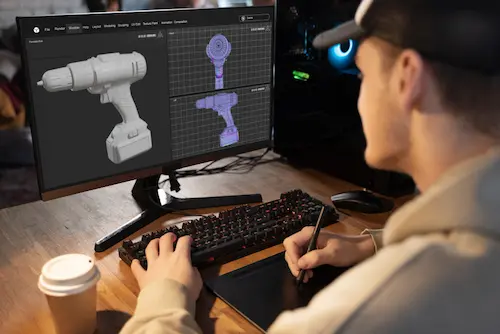
The digital model can be created using CAD or 3D modelling software. It is then prepared in slicing software, which converts the model into instructions that the printer can follow.
Unlike many traditional manufacturing methods that cut, drill or mill material away, additive manufacturing adds material where it is needed. This makes 3D printing especially useful for custom parts, prototypes and design iterations.
How Does 3D Printing Work?
Although different printers use different technologies, the basic workflow is similar.
Major Types of 3D Printing
Different 3D printing technologies are suited to different applications. Three important technologies for beginners to understand are FDM, SLA/resin and SLS.
FDM 3D Printing
Fused Deposition Modelling (FDM) is one of the most common 3D printing methods. An FDM printer heats plastic filament and deposits it through a nozzle. The material cools and solidifies as each layer is created. Common materials include PLA, PETG and ABS. FDM is widely used for educational projects, prototypes, mechanical components, enclosures, fixtures, robotics projects and maker applications. It is often a practical starting point for 3D printing for beginners.
SLA / Resin 3D Printing
SLA and related resin printing technologies use liquid resin that is selectively cured using light. Resin printers can produce detailed parts with smooth surfaces, making them useful for visual prototypes, detailed models and designs with fine features.
SLS 3D Printing
Selective Laser Sintering (SLS) uses a laser to fuse powdered material layer by layer. The surrounding powder can support complex geometries during printing, reducing the need for conventional support structures. SLS is used for functional prototypes and certain engineering applications.
Materials Used in 3D Printing
The right material depends on the printer, design and intended use.
PLA
PLA is widely used for learning, prototypes and general-purpose prints because it is relatively easy to print and is common in educational and maker environments.
ABS
ABS is used for applications requiring useful strength and heat resistance, although it can require better temperature control and suitable ventilation.
PETG
PETG offers a useful combination of strength, durability and printability and is commonly used for functional parts.
Resin
Resins are used with SLA and similar printers when detailed surfaces and fine features are important.
Major Applications of 3D Printing
3D printing is useful across education, engineering, product development and hardware projects. Some of the most common applications are described below.
Rapid Prototyping
One of the biggest advantages of 3D printing is the ability to quickly create a physical version of a design. A designer can print a prototype, check dimensions, identify problems and modify the CAD model before moving toward a final manufacturing process.
Product Development
Product teams can print several design variations to compare shape, size, ergonomics and component placement. For example, a handheld device enclosure can be designed in CAD and printed as a physical shell before the final design is selected.
Mechanical Parts
3D printers can produce brackets, mounts, covers, fixtures and other custom mechanical components. For low-volume projects and prototypes, this can be a practical way to test a part before selecting a conventional manufacturing process.
Electronics and Hardware
3D printing is closely connected to electronics development. Engineers can design custom enclosures for PCBs, sensors, IoT devices and embedded systems. Mounting brackets and cable-management parts can also be designed around actual hardware. Students interested in this area can combine CAD and 3D printing with IoT development. CoderMonk also offers an IoT Training Course in Jalandhar for learners interested in hardware and connected-device development.
Robotics
Robotics projects often need custom mechanical parts that are not available as standard components. 3D printing can be used for robot frames, sensor mounts, wheels, brackets, covers and other components. For learners combining mechanical design, electronics and programming, 3D printing can become a useful part of robotics development. CoderMonk's Robotics Course in Jalandhar is another relevant learning path for students interested in practical robotics.
Education
3D printers are useful in classrooms, engineering labs and maker spaces because students can turn digital designs into physical objects. Designing, printing and inspecting a component can make concepts related to geometry, engineering design and manufacturing more practical.
Architecture
Architecture and design students can use 3D printing to create physical scale models. Buildings, structural concepts and interior layouts can be represented as physical models to review proportions and design details.
Benefits of 3D Printing
- Faster prototyping: Designers can move from a digital model to a physical prototype without waiting for a full traditional manufacturing setup.
- Easy design iteration: If a prototype does not fit or perform as expected, the CAD model can be changed and printed again.
- Customisation: 3D printing is suitable for custom parts, especially when only a small number of units are needed.
- Complex geometries: Additive manufacturing can create shapes that may be difficult or expensive to produce using some conventional processes.
- Reduced material waste: Because material is added layer by layer, some applications can reduce waste compared with subtractive processes.
- Useful for learning: Students can combine design, engineering and manufacturing concepts in one practical workflow.
CAD and 3D Printing — Why They Work Together
CAD and 3D printing are closely connected because the printer needs a digital model. CAD software provides a practical way to create accurate models that can then be prepared for printing.
A learner who understands CAD can design or modify parts instead of relying only on models downloaded from the internet. For example, a student building an IoT device may need an enclosure with openings for a display, buttons, sensors and connectors. CAD makes it possible to design that enclosure around the actual electronics.
This is why learning CAD and 3D printing together can be more useful than learning printer operation alone. Learners interested in developing these skills can explore CoderMonk's CAD and 3D Design Course in Jalandhar.
Skills Required to Learn 3D Printing
Career Opportunities in 3D Printing
3D printing skills can support several career directions when combined with CAD, engineering, product development or manufacturing knowledge.
3D Printing Technician
A 3D printing technician may prepare models, operate printers, manage materials and troubleshoot printing problems.
CAD Designer
CAD designers create detailed digital models used for prototypes, products and manufacturing.
Product Design Professional
Product designers can use CAD and 3D printing to develop and test physical product concepts.
Prototyping Specialist
Prototyping professionals work on converting design concepts into physical models for testing and development.
Mechanical Design Roles
Knowledge of 3D modelling and additive manufacturing can complement mechanical engineering skills.
Robotics and Hardware Development
Robotics and embedded hardware projects often require custom physical components. Combining electronics, CAD and 3D printing can therefore be useful for engineers working on prototypes.
Who Should Learn 3D Printing?
Engineering students, diploma students, mechanical design learners, electronics students, robotics enthusiasts, product designers, architecture students, makers, hobbyists and startup founders developing physical products can all benefit from learning 3D printing.
If you already have CAD, mechanical design or electronics knowledge, adding 3D printing can help you turn digital concepts into physical prototypes.
How Beginners Can Start Learning 3D Printing
Why Practical 3D Printing Training Is Important
Online videos can introduce the basics, but practical experience helps learners understand how the process behaves in real situations.
A useful 3D printing course should ideally cover CAD modelling, preparing models for printing, slicing, printer settings, materials and troubleshooting.
Hands-on work also helps learners understand why a theoretically correct model may still produce a poor physical print. Orientation, wall thickness, support structures and material selection can all affect the result.
For students looking for 3D printing classes in Jalandhar, practical training can be especially useful when the course includes actual CAD modelling and printing exercises.
CoderMonk provides CAD & 3D Design training in Jalandhar, giving learners practical exposure to CAD modelling, 3D design, slicing and 3D printing.
Frequently Asked Questions
What is 3D printing?+
Is 3D printing difficult to learn?+
Do I need CAD skills for 3D printing?+
Which software is used for 3D printing?+
What can I make with a 3D printer?+
Is 3D printing a good career skill?+
Is there a 3D printing course in Jalandhar?+
Conclusion
3D printing technology has become a practical tool for learning, prototyping, product development, robotics, electronics and engineering design. Its real value comes from being able to move from a digital idea to a physical part, test that part and improve the design.
For beginners, the best starting point is to learn the complete workflow: understand 3D printing, develop basic CAD skills, learn slicing and materials, and apply those skills through practical projects.
If you are looking for a 3D printing course in Jalandhar or want to build skills in CAD and 3D design, explore CoderMonk's CAD & 3D Design Course in Jalandhar. You can also contact CoderMonk to learn more about the training and course details.
